
A beginners guide Skills
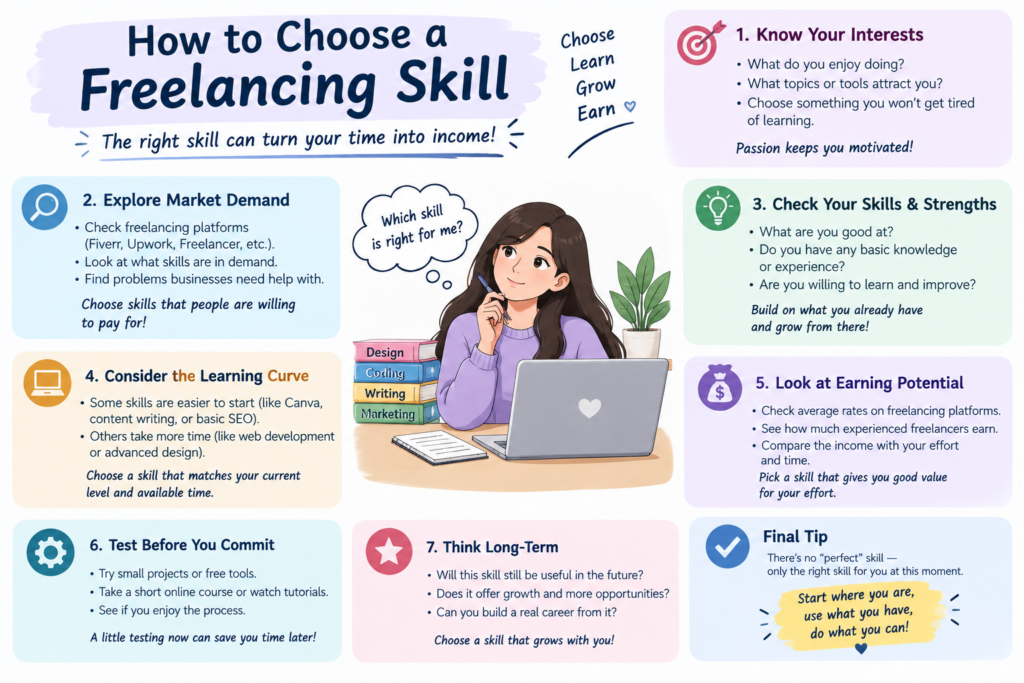
Choosing the right freelancing skill is one of the most important decisions you can make when starting your freelance career. With so many options available, beginners often feel confused about which skill they should learn.
The good news is that you do not need to learn every skill. You can start with one useful skill, practice it consistently, and gradually build your freelance career.
In this guide, you will learn how to choose a freelancing skill, what factors to consider, which beginners can explore, and how to decide which option fits you. click here
What Is a Freelancing skills?
A freelancing skill is that you can use to provide a service to clients independently.
For example, a person who knows graphic design can offer logo and social media design services. Someone with writing skills can offer blog writing or website content services.
Some common freelancing skills include:
- Content writing
- Graphic design
- WordPress
- Web development
- SEO
- Video editing
- Social media management
- Virtual assistance
- Translation
- Presentation design
The best choice depends on your interests, existing abilities, learning goals, and the type of work you want to do.
Why Is Choosing the Right Skill Important?
Your skill becomes the foundation of your freelance service.
If you choose a skill that you enjoy learning, you may find it easier to practice consistently. A clear skill also makes it easier to build a portfolio and explain your service to potential clients.
For example, instead of saying:
“I can do many things online.”
You could say:
“I create WordPress websites for small businesses.”
The second statement gives a potential client a much clearer idea of what you offer.
Step 1: Think About Your Interests skills
Start by asking yourself what type of work you actually enjoy.
Consider questions such as:
- Do I enjoy writing?
- Do I like designing things?
- Do I enjoy working with websites?
- Do I like solving technical problems?
- Do I enjoy editing videos?
- Do I like communicating with people?
- Do I prefer creative or structured tasks?
Your interests are not the only factor, but they can help you choose something you are willing to practice for a long time.
Step 2: Consider Your Existing Skills
You may already have useful skills without realizing it.
For example:
If you are good at writing → consider content writing.
If you enjoy making visual designs → consider graphic design.
If you understand websites → consider WordPress or web development.
If you enjoy researching and analyzing websites → consider SEO.
If you are organized and good at managing tasks → consider virtual assistance.
Starting with something related to an existing ability can make the learning process easier.
Step 3: Look at the Services Clients Need
A freelancing skill should solve a real problem for a client.
Before choosing a skill, research the types of services businesses and individuals commonly hire freelancers to provide.
For example, businesses may need help with:
- Websites
- Blog content
- Search engine optimization
- Social media content
- Graphics
- Video editing
- Administrative tasks
The goal is not simply to choose a popular skill. Look for a skill that you can develop into a useful service.
Step 4: Check Your Learning Curve
Some skills can be started relatively quickly, while others require considerably more time and practice.
For example, basic content writing may have a different learning path from web development.
Ask yourself:
How much time am I willing to spend learning this skill?
If you can consistently dedicate time to learning and practice, you can gradually develop more advanced abilities.
Do not choose a skill simply because someone claims it can make money quickly.
Step 5: Choose One Skill to Start
One common beginner mistake is trying to learn five or six skills simultaneously.
Instead, choose one primary skill.
For example:
Primary skill: WordPress website creation
You can later add related skills such as:
SEO + basic graphic design + website optimization
These complementary skills can make your main service more useful.
Start narrow and expand gradually.
Beginner-Friendly Freelancing Skill to Explore
Here are several areas beginners can consider.
1. Content Writing
Content writers create articles, website pages, product descriptions, and other written material.
This may suit people who enjoy researching and writing.
2. Graphic Design
Graphic designers create visual content such as social media graphics, presentations, banners, and marketing materials.
Basic design principles and familiarity with design software are important.
3. WordPress
WordPress freelancers can help create, customize, and maintain websites.
This can be a useful option for people interested in websites and technology.
4. SEO
SEO professionals help improve a website’s visibility in search engines.
SEO involves areas such as keyword research, content optimization, technical improvements, and website analysis.
5. Video Editing
Video editors transform raw footage into finished videos.
This can include cutting clips, adding transitions, improving audio, adding text, and creating content for different platforms.
6. Social Media Management
Social media managers help businesses plan, create, organize, and manage their social media content.
This can involve content planning, basic design, writing captions, and monitoring performance.
7. Virtual Assistance
Virtual assistants help clients with administrative and organizational tasks.
Depending on the client, this might include scheduling, research, data organization, email-related tasks, or other business support.
How to Compare Different Freelancing Skills
Create a simple table before making your decision.
| Skill | Do I Enjoy It? | Can I Learn It? | Can I Practice It? | Can I Build a Portfolio? |
|---|---|---|---|---|
| Content Writing | ✓/✗ | ✓/✗ | ✓/✗ | ✓/✗ |
| Graphic Design | ✓/✗ | ✓/✗ | ✓/✗ | ✓/✗ |
| WordPress | ✓/✗ | ✓/✗ | ✓/✗ | ✓/✗ |
| SEO | ✓/✗ | ✓/✗ | ✓/✗ | ✓/✗ |
| Video Editing | ✓/✗ | ✓/✗ | ✓/✗ | ✓/✗ |
There is no universal “best” freelancing skill. The right starting point depends on your situation and goals.
Step 6: Practice Before Looking for Clients
Once you have selected a skill, practice it before immediately searching for paid projects.
Create sample projects that demonstrate what you can do.
For example:
Writing: Create three original blog articles.
Graphic design: Create sample social media posts.
WordPress: Build a sample website.
SEO: Practice optimizing a sample website or analyze a public website.
Video editing: Create original sample edits using footage you are allowed to use.
These projects can eventually become part of your portfolio.
Step 7: Build a Portfolio Around Your Skill
Once you have several good examples, organize them into a simple portfolio.
Your portfolio should show:
- What service you provide
- Examples of your work
- The tools you use
- Your approach to projects
- How potential clients can contact you
Quality is more important than having a huge number of samples.
Step 8: Reassess Your Choice
After practicing your skill for a few weeks, evaluate your progress.
Ask:
- Am I enjoying this work?
- Am I improving?
- Can I create useful projects?
- Do I understand what clients need?
- Do I want to continue learning this skill?
If the answer is mostly yes, continue developing it.
If you discover that the skill does not suit you, you can explore another option. Choosing your first skill does not mean you are locked into it forever.
Mistakes to Avoid When Choosing a Freelancing Skill
Choosing a Skill Only Because It Is Trending
Trends change. Choose something you are genuinely willing to learn and practice.
Trying to Learn Everything
Too many skills can make it difficult to develop a strong foundation.
Expecting Immediate Income
Learning a skill and building a freelance career takes time. Avoid promises that suggest guaranteed or instant earnings.
Copying Someone Else’s Career
A skill that works well for one person may not be the right choice for you.
Ignoring Practice
Watching tutorials is useful, but practical work is essential for developing a skill.
A Simple Formula for Choosing Your Skill
You can use this simple process:
Interest + Existing Ability + Learning Commitment + Client Need = Potential Freelancing Skill
You do not need every factor to be perfect. The goal is to find a skill that you can realistically learn and turn into a useful service.
Frequently Asked Questions
What is the best freelancing skill for beginners?
There is no single best skill for every beginner. Content writing, graphic design, WordPress, SEO, video editing, social media management, and virtual assistance are some areas you can explore.
How many freelancing skills should I learn?
Start with one primary skill. Once you become comfortable with it, you can learn related skills that complement your main service.
How long does it take to learn a freelancing skill?
It depends on the skill, your previous knowledge, and how consistently you practice. Focus on developing practical ability rather than trying to reach a specific number of days.
Can I change my freelancing skill later?
Yes. Your first skill does not have to be your permanent career. You can add new skills or change direction as your interests and experience develop.
Can I freelance without professional experience?
Yes. You can create sample projects to demonstrate your abilities and use those projects as the foundation of your portfolio.
Final Thoughts
Choosing a freelancing skill does not have to be complicated. Start by considering your interests, existing abilities, learning commitment, and the problems you can solve for clients.
Choose one skill, learn the fundamentals, practice through real projects, and build a portfolio. Once you develop confidence in your ability, you can start exploring freelance opportunities.
Your goal at the beginning should be simple:
Choose → Learn → Practice → Build → Improve → Freelance
Copyright © 2026 – WordPress Theme by CreativeThemes